

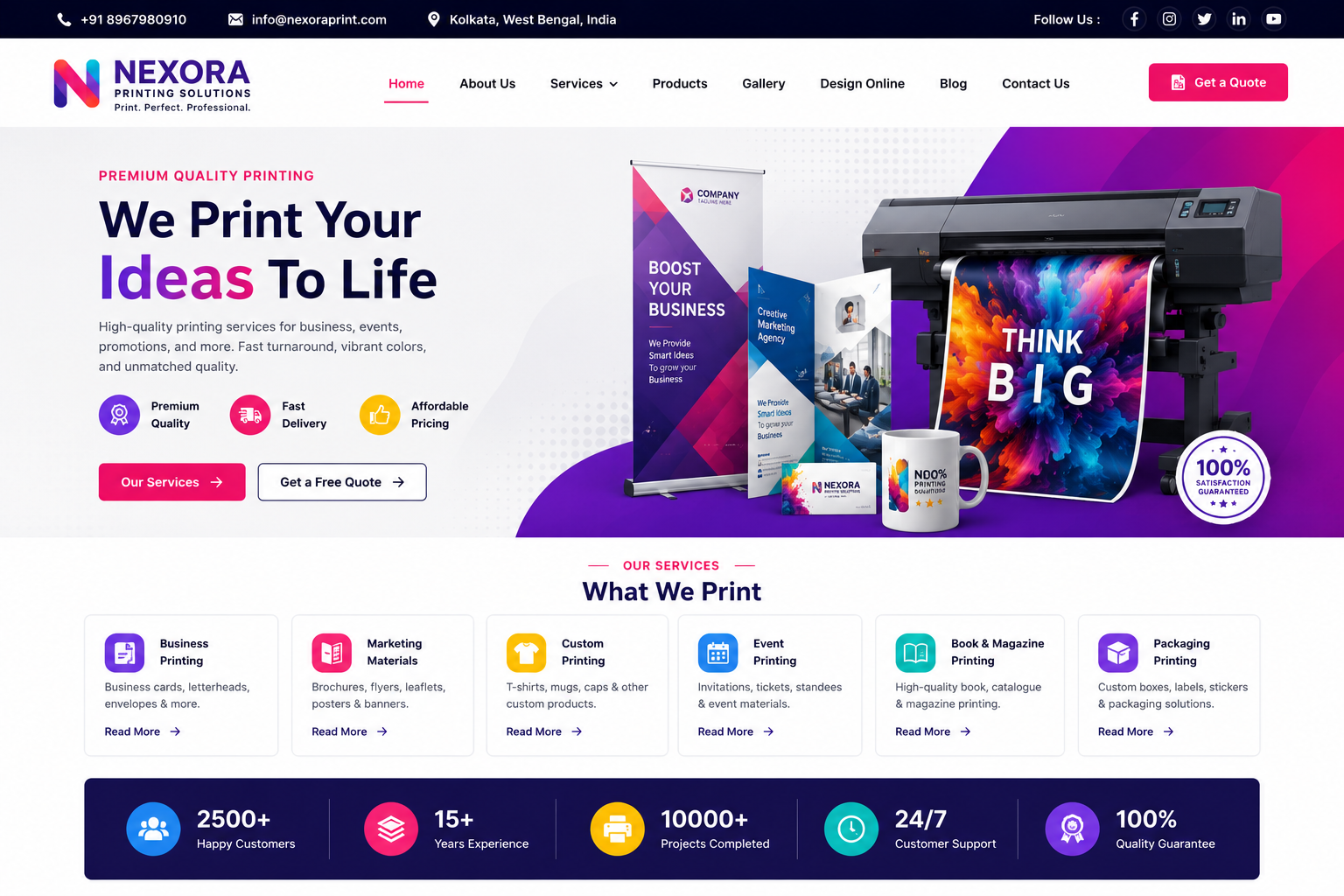
Printing Website
Printing Website Development
In today’s competitive printing industry, customers increasingly search online for printing services, business cards, brochures, flyers, banners, visiting cards, packaging, invitations, signage, promotional materials, and customized printing solutions. A professional Printing Website helps printing businesses showcase their products and services, display pricing or starting prices, receive quotation requests, accept online orders, and build a strong digital presence.
At Nexora IT Hub, we develop modern, responsive, secure, fast-loading, user-friendly, and SEO-friendly Printing Websites customized for printing presses, digital printing companies, offset printing businesses, packaging companies, signage providers, commercial printers, and customized printing businesses.
A professional printing website can include Printing Services, Product Catalog, Online Printing Orders, Product Categories, Customization Options, File Upload, Quantity Selection, Size Selection, Material Selection, Finishing Options, Pricing, Quote Requests, Online Payments, Order Tracking, Customer Accounts, Portfolio, Testimonials, Gallery, Blog, Contact Forms, WhatsApp Integration, and Admin Dashboard.
Whether you provide Digital Printing, Offset Printing, Business Card Printing, Brochure Printing, Flyer Printing, Banner Printing, Poster Printing, Packaging Printing, Label Printing, Invitation Card Printing, Book Printing, T-Shirt Printing, Mug Printing, Photo Printing, or Corporate Printing Services, a professional website can help you present your services and generate new customer enquiries.
What Is a Printing Website?
A Printing Website is an online platform where customers can discover printing services, view products, submit requirements, request quotations, and place printing orders.
A basic printing website can include:
- Home
- About Us
- Printing Services
- Product Categories
- Portfolio
- Pricing
- Custom Printing
- Gallery
- Testimonials
- Blog
- Quote Request
- Contact
An advanced printing platform can additionally provide:
- Online Product Ordering
- File Upload
- Product Customization
- Quantity Selection
- Online Payment
- Customer Login
- Order Tracking
- Delivery Information
- Coupon Codes
- Invoice Generation
- Admin Dashboard
Why Does a Printing Business Need a Professional Website?
Showcase Printing Services
Present your complete range of printing products and services in one organized platform.
Generate More Enquiries
Allow customers to submit printing requirements and request customized quotations online.
Accept Orders Online
Customers can select products, quantities, sizes, materials, and finishing options and submit orders digitally.
Build Business Credibility
A professional website can showcase your printing capabilities, machinery, previous projects, testimonials, and company information.
Reach Local Customers
SEO-friendly location and service pages can help potential customers discover your printing business online.
Promote Your Printing Products
Dedicated product pages can target customers searching for specific printing solutions.
Key Features of a Professional Printing Website
1. Modern & Professional Printing Website Design
A printing website should make it easy for customers to find products and understand available options.
The homepage can include:
- Professional Hero Banner
- Printing Services
- Popular Products
- Featured Products
- Custom Printing
- Why Choose Us
- Portfolio
- Testimonials
- Special Offers
- Quote Request
- Blog
- Contact
The design can be customized according to your brand identity.
2. Fully Responsive Design
Customers may browse printing services using smartphones, tablets, laptops, or desktop computers.
A responsive website ensures that:
- Product information is readable
- Images display correctly
- Forms work properly
- Pricing is easy to understand
- Order buttons remain accessible
3. Professional Homepage
The homepage can provide a complete overview of your printing business.
Recommended sections include:
- Hero Section
- Printing Products
- Services
- Popular Categories
- Custom Printing
- Business Solutions
- Portfolio
- Customer Reviews
- How It Works
- Quote Request
- FAQs
- Blog
- Contact
Clear Order Now, Get Quote, and Contact Us buttons can help visitors take action.
4. Printing Product Catalog
Create a complete catalog of printing products.
Examples include:
- Business Cards
- Visiting Cards
- Brochures
- Flyers
- Posters
- Banners
- Letterheads
- Envelopes
- Booklets
- Catalogs
- Labels
- Stickers
- Invitations
- Packaging
- Certificates
- Calendars
- Menus
- Signage
Each product can have its own dedicated page.
5. Business Card Printing
Create a dedicated business card printing page.
Customers can view:
- Card Sizes
- Paper Options
- Single/Double Side
- Finish Options
- Quantity
- Custom Design
- Delivery Information
A Get Quote or Order Now button can be placed prominently.
6. Brochure Printing
Promote brochure printing services for businesses and organizations.
Options can include:
- Bi-Fold Brochures
- Tri-Fold Brochures
- Corporate Brochures
- Product Brochures
- Marketing Brochures
Product pages can explain available sizes, papers, printing quality, and finishing options.
7. Flyer Printing
Create dedicated pages for promotional flyer printing.
Flyer options can include:
- A4
- A5
- A6
- Custom Sizes
- Single-Sided
- Double-Sided
- Different Paper Types
Customers can submit custom requirements through an enquiry or ordering system.
8. Banner & Poster Printing
Showcase large-format printing services.
Examples include:
- Event Banners
- Business Banners
- Promotional Banners
- Outdoor Posters
- Indoor Posters
- Promotional Displays
The website can provide information about sizes, materials, finishing, and installation where applicable.
9. Packaging Printing
A professional printing website can showcase packaging solutions.
Examples include:
- Product Boxes
- Food Packaging
- Retail Packaging
- Custom Boxes
- Paper Bags
- Product Labels
- Packaging Sleeves
Businesses can request customized packaging quotations.
10. Label & Sticker Printing
Create a dedicated category for:
- Product Labels
- Bottle Labels
- Packaging Labels
- Barcode Labels
- Promotional Stickers
- Custom Stickers
- Logo Stickers
Customers can choose sizes, materials, quantities, and finishing options where supported.
11. Invitation Card Printing
Promote customized invitation printing.
Examples include:
- Wedding Invitations
- Birthday Invitations
- Anniversary Invitations
- Corporate Invitations
- Event Invitations
- Party Invitations
A gallery can showcase different invitation designs.
12. Book & Magazine Printing
Offer information about:
- Book Printing
- Magazine Printing
- Company Profiles
- Catalog Printing
- Annual Reports
- Training Manuals
- Educational Materials
Dedicated product pages can explain available formats and finishing options.
13. T-Shirt & Merchandise Printing
If your business provides customized merchandise printing, create dedicated pages for:
- T-Shirt Printing
- Mug Printing
- Cap Printing
- Bag Printing
- Promotional Products
- Corporate Gifts
14. Product Customization
An advanced printing website can allow customers to select product specifications.
Customization options can include:
- Size
- Quantity
- Paper
- Material
- Color
- Printing Side
- Finish
- Binding
- Delivery Option
The available options depend on your printing equipment and business workflow.
15. Online Printing Order System
Customers can place printing orders directly through the website.
A typical process can be:
Select Product → Choose Specifications → Upload Design → Enter Quantity → Review Price → Submit Order → Make Payment → Receive Confirmation
This can significantly simplify the ordering process.
16. File Upload
Allow customers to upload their printing designs.
Supported file types can be configured according to your requirements, such as:
- JPG
- PNG
- AI
- PSD
- Other supported formats
File size and security restrictions should be configured appropriately.
17. Artwork Upload
Customers can upload their ready-to-print artwork while placing an order.
The system can collect:
- Design File
- Product
- Quantity
- Specifications
- Special Instructions
The printing team can access the submitted files through the admin panel.
18. Custom Printing Request
Not every printing requirement fits a standard product.
A Custom Printing Request form can collect:
- Product Type
- Size
- Quantity
- Material
- Printing Requirements
- Finishing
- Delivery Location
- Reference File
- Additional Instructions
The printing team can then provide a customized quotation.
19. Quote Request System
A quotation system can help businesses manage bulk and customized orders.
Customers can request quotes for:
- Corporate Printing
- Bulk Printing
- Packaging
- Promotional Materials
- Large-Format Printing
- Custom Projects
Quote requests can be managed from the admin dashboard.
20. Quantity Selection
Customers can select required quantities.
For example:
- 100
- 250
- 500
- 1,000
- 5,000
- Custom Quantity
Pricing can be configured according to the business's pricing model.
21. Dynamic Pricing
An advanced printing website can calculate prices based on selected specifications.
Possible pricing variables include:
- Product
- Quantity
- Size
- Paper
- Material
- Color
- Finishing
- Binding
- Delivery
Dynamic pricing rules should be configured according to actual production costs and business policies.
22. Online Payment Integration
If required, the website can integrate an online payment gateway.
Depending on the payment provider, customers may be able to use:
- UPI
- Debit Card
- Credit Card
- Net Banking
- Other Supported Methods
Payment functionality should be implemented using appropriate security practices.
23. Order Confirmation
After a successful order, customers can receive confirmation containing:
- Order ID
- Product
- Quantity
- Specifications
- Amount
- Payment Status
- Order Status
- Customer Details
24. Customer Login & Dashboard
Customers can create accounts and manage their orders.
The dashboard can include:
- Profile
- Orders
- Order Details
- Payment History
- Uploaded Files
- Invoices
- Delivery Information
- Saved Addresses
25. Order Tracking
Customers can track their printing order through different stages.
Example workflow:
Order Received → Artwork Review → Printing → Finishing → Quality Check → Dispatch → Delivered
The exact workflow can be customized.
26. Invoice Generation
The system can generate digital invoices for eligible orders.
Invoices may contain:
- Invoice Number
- Customer Details
- Product Details
- Quantity
- Taxes where applicable
- Total Amount
- Payment Status
27. Delivery Management
The website can provide delivery information.
Depending on your business model, options can include:
- Local Delivery
- Courier
- Pickup
- Shipping
- Delivery Charges
- Estimated Delivery Time
Actual delivery availability should be based on your service area and logistics.
28. Portfolio
Showcase previous printing projects.
Portfolio categories can include:
- Corporate Printing
- Wedding Printing
- Packaging
- Branding Materials
- Marketing Materials
- Signage
- Promotional Products
This allows prospective customers to see your capabilities.
29. Printing Gallery
A visual gallery can display completed work.
The gallery can include:
- Business Cards
- Brochures
- Packaging
- Posters
- Banners
- Invitations
- Labels
- Books
30. Testimonials
Display genuine customer reviews.
Testimonials can include:
- Customer Name
- Business Name where permitted
- Product Ordered
- Review
- Rating
Authentic reviews can help establish trust.
31. Corporate Printing Services
Create a dedicated page for business clients.
Corporate printing can include:
- Business Cards
- Letterheads
- Envelopes
- Brochures
- Company Profiles
- Product Catalogs
- Presentation Materials
- Promotional Materials
32. Bulk Printing Services
Create a dedicated bulk-order page for businesses and organizations.
Customers can submit requirements for:
- Large Quantity Orders
- Corporate Printing
- Event Materials
- Educational Materials
- Marketing Campaigns
- Packaging
33. Design Services
If your printing company also provides graphic design, showcase it separately.
Services can include:
- Logo Design
- Business Card Design
- Brochure Design
- Flyer Design
- Banner Design
- Packaging Design
- Invitation Design
- Social Media Design
34. Blog Section
A printing blog can attract customers searching for printing information.
Content ideas include:
- Business Card Design Tips
- Brochure Printing Guide
- Choosing Paper for Printing
- Digital vs Offset Printing
- Packaging Design Tips
- Flyer Design Ideas
- Printing Cost Guides
- Business Branding Tips
Useful original content can support long-term SEO.
35. Local SEO
Local printing businesses can create useful location-based pages for areas they actually serve.
Examples:
- Printing Services in Kolkata
- Digital Printing in West Bengal
- Business Card Printing in Kolkata
- Packaging Printing Services
Location pages should provide genuinely useful local information rather than repetitive keyword content.
36. Printing Service SEO
Create individual pages for important services.
Examples:
- Digital Printing
- Offset Printing
- Business Card Printing
- Brochure Printing
- Banner Printing
- Packaging Printing
- Label Printing
- Invitation Printing
Each page can target a specific search intent.
37. Image SEO
Printing websites often depend on product images.
Optimize images using:
- Descriptive File Names
- Alt Text
- Compression
- Responsive Images
- Modern Formats
- Lazy Loading
This can improve both performance and accessibility.
38. Fast Website Performance
A printing website containing many product images should be optimized for speed.
Performance improvements can include:
- Image Compression
- Lazy Loading
- Browser Caching
- CDN where appropriate
- Efficient Code
- Optimized Hosting
- Reduced Unnecessary Scripts
39. WhatsApp Integration
A WhatsApp button can allow customers to quickly ask about:
- Product Availability
- Pricing
- Custom Printing
- Bulk Orders
- Delivery
- Design Requirements
40. Admin Dashboard
A centralized admin panel can allow authorized staff to manage:
- Products
- Categories
- Services
- Orders
- Customers
- Quotations
- Payments
- Files
- Delivery
- Coupons
- Testimonials
- Portfolio
- Gallery
- Blogs
- Website Content
Benefits of a Professional Printing Website
1. Generate More Printing Enquiries
Customers can submit requirements and request quotations online.
2. Accept Orders 24/7
An online ordering system can allow customers to place printing orders outside normal business hours.
3. Showcase Your Products
Display your entire printing catalog in an organized digital format.
4. Increase Customer Convenience
Customers can review products, select specifications, upload files, and submit orders online.
5. Build Professional Credibility
A modern website can showcase your printing capabilities, projects, testimonials, and company information.
6. Reach More Local Customers
Local SEO can help potential customers find printing services in your target areas.
7. Simplify Bulk Orders
Quote request and enquiry systems can make bulk and customized order management easier.
8. Reduce Manual Work
Automated order confirmations, customer dashboards, invoices, and status updates can streamline operations.
9. Promote Your Brand
A professional website creates a dedicated digital identity for your printing company.
10. Scale Your Printing Business
The platform can expand with new products, locations, customers, services, and advanced ordering features.
Printing Website Development Process
1. Requirement Analysis
We understand your printing products, services, pricing model, order workflow, delivery areas, and customer requirements.
2. Website Planning
We plan product categories, service pages, catalog structure, ordering flow, quote requests, customer accounts, and admin features.
3. UI/UX Design
We create a clean, modern, professional, and conversion-focused interface.
4. Website Development
The approved design is developed into a responsive and functional website.
5. Product & Catalog Integration
Products, services, specifications, images, pricing information, and portfolio content are integrated.
6. Order & Enquiry Integration
Online ordering, file uploads, quote requests, payment functionality, and customer dashboards are implemented according to requirements.
7. SEO Setup
Technical and on-page SEO foundations are configured.
8. Image & Performance Optimization
Product images and website resources are optimized for better loading performance.
9. Testing
The website is tested across mobile, tablet, laptop, and desktop devices.
Product selection, forms, file uploads, orders, payments, customer accounts, and other features are reviewed.
10. Launch
After final approval, the website is deployed to your selected domain and hosting environment.
11. Maintenance & Support
Ongoing technical support can include security updates, product changes, performance optimization, content updates, and future development.
SEO Strategy for Printing Websites
A strong printing SEO strategy should focus on printing services, products, locations, industries, and customer search intent.
Product-Based SEO
Create individual pages for:
- Business Card Printing
- Brochure Printing
- Flyer Printing
- Banner Printing
- Poster Printing
- Label Printing
- Packaging Printing
- Invitation Printing
Service-Based SEO
Create pages for:
- Digital Printing
- Offset Printing
- Large Format Printing
- Commercial Printing
- Custom Printing
Local SEO
Target locations where you actually provide printing services.
Industry-Based SEO
Create useful pages for industries such as:
- Corporate
- Retail
- Education
- Hospitality
- Healthcare
- Events
- E-commerce
Blog SEO
Publish useful content around:
- Printing Guides
- Paper Selection
- Branding Materials
- Packaging
- Printing Costs
- Design Tips
Technical SEO
Maintain:
- Mobile-Friendly Design
- Fast Loading
- Clean URLs
- XML Sitemap
- Internal Linking
- HTTPS
- Optimized Images
- Appropriate Structured Data
SEO provides a strong foundation for search visibility, but rankings depend on competition, content quality, website authority, technical implementation, and other factors.
Why Choose Nexora IT Hub for Printing Website Development?
At Nexora IT Hub, we develop professional digital solutions for printing companies, commercial printers, digital printing businesses, packaging companies, and customized printing businesses.
Professional Printing Design
Create a clean and attractive website that presents your printing products professionally.
Online Ordering
Allow customers to select products, specifications, quantities, upload files, and submit orders.
Quote Management
Capture bulk and customized printing requirements through online quotation forms.
Product Catalog
Organize your printing products into categories with dedicated pages.
SEO-Friendly Architecture
Build a strong foundation for product, service, local, and industry-based SEO.
Performance Optimization
Optimize product images and website resources for a faster browsing experience.
Secure Development
Use security-conscious practices for customer accounts, file uploads, payments, and administrative access.
Easy Content Management
Manage products, services, prices, orders, customers, galleries, blogs, and enquiries through an admin panel.
Scalable Development
Start with a professional printing company website and expand into a complete online printing ordering platform.
Ongoing Support
Receive technical support for maintenance, updates, improvements, and future development.
Build Your Printing Website with Nexora IT Hub
A professional Printing Website can transform a traditional printing business into a stronger digital-first brand.
From printing product catalogs and service pages to online orders, file uploads, product customization, quantity selection, quotation requests, online payments, customer accounts, order tracking, digital invoices, portfolios, galleries, testimonials, blogs, WhatsApp integration, and SEO-friendly product pages, everything can be integrated into one customized platform.
At Nexora IT Hub, we develop modern, responsive, secure, fast-loading, user-friendly, and SEO-friendly Printing Websites designed around your business requirements.
Whether you operate a digital printing shop, offset printing press, commercial printing company, packaging business, signage company, customized printing service, or corporate printing business, we can create a scalable digital platform designed to help you showcase your products, attract customers, generate enquiries, simplify orders, and grow your printing business online.
Print Better. Reach More Customers. Grow Your Business.
Professional Design • Responsive • SEO-Friendly • Secure • Fast • Scalable • Easy to Manage