
Cable TV Website
Cable TV Website Development – Professional SEO Content
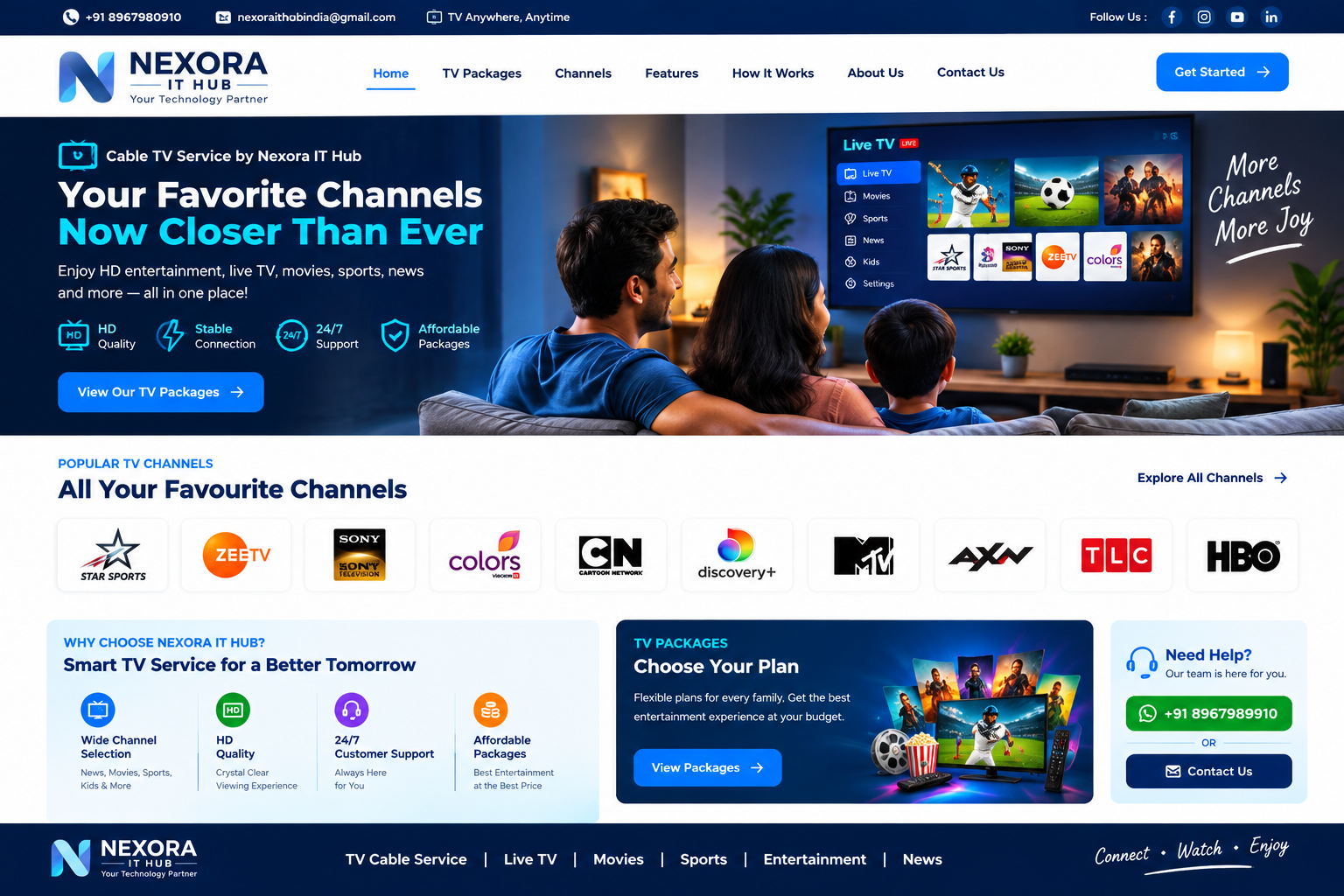
A Cable TV Website is a professional digital platform designed for cable operators, local television networks, MSOs, and broadcasting service providers to manage their services, customers, plans, recharge, payments, complaints, and communication online.
A modern Cable TV Website Development solution can provide customers with an easy way to view channel packages, check plans, make online payments, submit complaints, request new connections, and contact customer support. At the same time, the cable operator can manage customers, packages, billing, payments, connections, complaints, and reports from a centralized admin panel.
What Is a Cable TV Website?
A Cable TV Website is an online platform that allows cable television service providers to present their services and manage customer interactions digitally.
A professional Cable TV Website can include:
- Cable TV Service Information
- Channel Packages
- Subscription Plans
- New Connection Request
- Customer Registration
- Online Recharge
- Online Bill Payment
- Customer Login
- Customer Dashboard
- Complaint Management
- Service Request
- Payment History
- Invoice & Receipt
- Connection Management
- Area/Locality Management
- Customer Support
- Notifications
- Admin Dashboard
- Reports & Analytics
The website can be customized according to the requirements of local cable operators, cable networks, MSOs, and television service providers.
Why Does a Cable TV Business Need a Website?
Traditional cable businesses often depend heavily on phone calls, physical offices, and manual payment collection. A professional website can help digitize these processes.
Customers can use the website to:
- View available plans
- Check subscription details
- Pay bills online
- Recharge their connection
- Request a new connection
- Submit complaints
- Track service requests
- Download receipts
- Contact support
The operator can manage customer information, packages, payments, complaints, and service requests from one centralized platform.
40+ Key Features of a Professional Cable TV Website
1. Modern Professional Design
A clean and professional design helps establish trust and makes it easier for customers to find services, plans, payment options, and support information.
2. Fully Responsive Design
The website can be optimized for:
- Mobile
- Tablet
- Laptop
- Desktop
Customers can access their cable services from any device.
3. Professional Homepage
The homepage can showcase:
- Cable TV services
- Popular plans
- Channel packages
- New connection
- Recharge
- Online payment
- Customer support
- Latest announcements
- Contact information
4. Cable TV Service Plans
Display different subscription plans with clear information such as:
- Plan name
- Monthly price
- Validity
- Channel count
- SD/HD channels
- Regional channels
- Entertainment channels
- Sports channels
- News channels
5. Channel Package Management
Customers can browse available channel packages and understand what is included with each subscription.
6. New Connection Request
Customers can submit an online request for a new cable connection.
The form can collect:
- Customer name
- Mobile number
- Address
- Area
- PIN code
- Preferred package
- Installation requirements
7. Customer Registration
Customers can create their own accounts using their basic information and mobile number/email.
8. Customer Login
Registered customers can securely log in and access their account.
9. Customer Dashboard
A customer dashboard can provide:
- Active Plan
- Subscription Status
- Due Amount
- Recharge
- Payment History
- Complaint Status
- Service Requests
- Profile
- Notifications
10. Online Recharge
Customers can recharge their cable TV subscription online without visiting the office.
11. Online Bill Payment
The website can support online payment for cable TV bills.
Payment options may include supported:
- UPI
- Debit Card
- Credit Card
- Net Banking
- Wallets
12. Payment Gateway Integration
A secure payment gateway can be integrated for online recharge, subscription payments, and other services.
13. Payment History
Customers can view previous transactions from their dashboard.
Information can include:
- Transaction ID
- Amount
- Date
- Payment status
- Plan
- Receipt
14. Online Receipt / Invoice
The system can generate digital payment receipts or invoices after successful transactions.
15. Complaint Registration
Customers can submit complaints online.
Example complaint types:
- No Signal
- Channel Not Working
- Picture Quality
- Audio Problem
- Set-Top Box Problem
- Cable Connection Problem
- Payment Issue
16. Complaint Tracking
Customers can track the status of their complaints.
Possible statuses:
- Submitted
- Assigned
- In Progress
- Resolved
- Closed
17. Service Request Management
Customers can request services such as:
- New Connection
- Connection Transfer
- Package Change
- Set-Top Box Replacement
- Technical Support
- Disconnection
- Reconnection
18. Customer Support
A dedicated support section can provide:
- Phone number
- Office information
- Support hours
- Complaint form
19. WhatsApp Integration
A WhatsApp button can allow customers to contact the cable operator quickly.
20. Area / Locality Management
Cable operators serving multiple areas can organize customers according to:
- City
- Town
- Village
- Area
- Ward
- PIN Code
This makes customer management easier.
21. Customer Connection Management
The admin can manage customer connection details including:
- Customer ID
- Connection number
- Package
- Installation date
- Subscription status
- Area
- Payment status
22. Set-Top Box Management
For operators using set-top boxes, the system can maintain information such as:
- Set-top box number
- Customer
- Installation date
- Status
- Replacement history
23. Package Upgrade / Downgrade
Customers can request a change to their existing subscription package.
24. Subscription Expiry Notifications
The system can notify customers when their subscription is approaching expiry.
Notifications can be delivered through available:
- SMS
- Website notifications
25. Payment Due Notifications
Customers can receive reminders regarding pending payments.
26. Automated Notifications
Notifications can be generated for:
- Successful payment
- Recharge
- Subscription activation
- Subscription expiry
- Complaint updates
- Service requests
- New announcements
27. Customer Profile Management
Customers can update permitted information such as:
- Name
- Mobile
- Address
- Password
28. Channel List
A dedicated channel list can display available channels with:
- Channel number
- Channel name
- Category
- Language
- HD/SD status
29. Channel Categories
Channels can be organized into:
- Entertainment
- Sports
- News
- Movies
- Kids
- Music
- Regional
- Devotional
- HD Channels
30. Promotional Banners
The homepage can display promotional banners for:
- New plans
- Special offers
- New channels
- Seasonal packages
- New services
31. Announcements Section
The operator can publish important notices such as:
- Service maintenance
- Channel updates
- Payment reminders
- Plan changes
- Technical announcements
32. Admin Dashboard
The admin panel can provide centralized management of:
- Customers
- Connections
- Packages
- Channels
- Payments
- Complaints
- Service requests
- Areas
- Notifications
- Reports
33. Staff / Operator Management
If required, separate staff accounts can be created with different permissions.
For example:
- Admin
- Support Staff
- Billing Staff
- Technician
- Area Manager
34. Technician Management
Technical complaints can be assigned to technicians.
The system can track:
- Technician
- Complaint
- Assigned date
- Status
- Resolution
- Customer feedback
35. Reports & Analytics
The admin can view reports such as:
- Total Customers
- Active Connections
- Expired Connections
- Monthly Revenue
- Pending Payments
- New Connections
- Complaints
- Resolved Complaints
- Popular Plans
36. Search & Filter
Admin users can quickly search customers based on:
- Customer ID
- Name
- Mobile
- Area
- Connection number
- Package
- Payment status
37. SEO-Friendly Structure
The website can be developed with SEO-friendly:
- URLs
- Page titles
- Meta descriptions
- Headings
- Image alt text
- Internal links
- Structured content
38. Local SEO
Cable TV operators can target local searches such as:
- Cable TV Service in [City]
- Cable Operator in [Area]
- Cable TV Connection in [Location]
- Best Cable TV Service in [City]
Location-specific pages can help present services to customers searching within the operator's service area.
39. Blog / News Section
A blog can publish:
- Channel updates
- Service announcements
- New packages
- Customer guides
- TV service information
- Local updates
40. Google Maps Integration
The website can display the cable operator's office or service location using map integration.
41. Social Media Integration
Social links can connect the website with:
- YouTube
42. Security
Security measures can include:
- SSL/HTTPS
- Secure login
- Password protection
- Role-based access
- Form validation
- Secure payment integration
- Database security
- Regular backups
43. Fast Loading Performance
The website can be optimized using:
- Image compression
- Lazy loading
- Browser caching
- Code optimization
- CDN support
- Database optimization
44. Scalable Architecture
The platform can be designed to support future features such as:
- Android App
- iOS App
- OTT Integration
- IPTV Services
- Automated Billing
- Advanced CRM
- Online TV Streaming
- Multi-operator Management
Benefits of a Cable TV Website
1. 24/7 Customer Access
Customers can access important account information and services online without visiting the cable office.
2. Online Payment Collection
Digital payment reduces dependence on manual payment collection.
3. Better Customer Service
Customers can submit and track complaints through the website.
4. Reduced Manual Work
Automated customer management, payments, notifications, and complaints can reduce administrative workload.
5. Increased Customer Convenience
Recharge, bill payment, plan information, and support can be available from one platform.
6. Stronger Online Presence
A professional website helps a cable operator establish a credible digital presence.
7. Local Customer Acquisition
SEO and local landing pages can help potential customers discover the service online.
8. Better Business Management
An integrated admin dashboard provides centralized control over customers, connections, payments, and complaints.
9. Transparent Payment Records
Digital transaction records make it easier to monitor customer payments and receipts.
10. Business Growth
A professional digital platform can support the expansion of the cable business into additional locations and services.
Cable TV Website Development Process
Step 1 – Requirement Analysis
We understand your cable business, service areas, customer types, packages, billing requirements, and operational workflow.
Step 2 – UI/UX Design
We design a simple and professional interface for customers and administrators.
Step 3 – Frontend Development
The responsive frontend is developed for mobile, tablet, and desktop.
Step 4 – Backend Development
The customer management, package management, billing, payment, complaint, and admin systems are developed.
Step 5 – Payment Integration
Online payment and recharge functionality can be integrated.
Step 6 – Customer Management
Customer registration, connection management, subscription management, and dashboards are implemented.
Step 7 – Complaint & Support System
Complaint registration, assignment, tracking, and resolution workflows are configured.
Step 8 – SEO Implementation
Technical SEO and on-page SEO elements are implemented throughout the website.
Step 9 – Testing
The website is tested for functionality, security, responsiveness, payment flow, and performance.
Step 10 – Launch & Support
After final approval, the website is deployed and ongoing maintenance/support can be provided.
SEO Strategy for a Cable TV Website
A Cable TV Website can target both service-related keywords and location-based keywords.
Technical SEO
- Mobile-friendly design
- HTTPS
- SEO-friendly URLs
- XML Sitemap
- Robots.txt
- Canonical URLs
- Fast page loading
- Search-engine-friendly architecture
On-Page SEO
Each important service page can have:
- SEO title
- Meta description
- H1 heading
- Relevant keywords
- Optimized images
- Internal links
- Useful service content
Local SEO
Location-specific pages can target searches related to the operator's actual service areas.
Content Marketing
Useful articles can target searches related to:
- Cable TV Plans
- Cable TV Recharge
- Cable TV Connection
- Cable TV Packages
- Cable TV Service
- Cable TV Troubleshooting
Who Can Use a Cable TV Website?
A customized Cable TV Website can be useful for:
- Local Cable Operators
- Cable TV Companies
- MSOs
- Local Television Networks
- Cable Service Providers
- IPTV Service Providers
- Digital Cable Operators
- Broadband & Cable Businesses
- Multi-Area Cable Networks
- TV Service Businesses
Why Choose Nexora IT Hub?
Nexora IT Hub can develop customized Cable TV Website solutions based on the operator's business requirements.
Our development approach can include:
- Professional UI/UX
- Responsive Website
- Customer Management
- Cable Plan Management
- Online Recharge
- Online Payment
- Complaint Management
- Service Requests
- Customer Dashboard
- Admin Dashboard
- SEO-Friendly Development
- Local SEO Structure
- Security
- Performance Optimization
- Maintenance & Support
The system can be customized for a small local cable operator as well as a larger cable network serving multiple locations.
Build Your Professional Cable TV Website
A modern Cable TV Website can transform traditional cable service management into a more convenient digital experience. Customers can check plans, recharge subscriptions, make payments, submit complaints, request services, and communicate with support online.
At the same time, cable operators can manage customers, connections, packages, payments, complaints, technicians, and reports from a centralized platform.
Nexora IT Hub provides professional Cable TV Website Development and Custom Software Development Solutions designed around your business requirements.
Call / WhatsApp: +91 8967980910
Email: nexoraithubindia@gmail.com